Data is only useful if it’s actionable. The Audience tab is where you turn raw customer data into targeted marketing lists.
1. Lists vs. Segments
-
Lists: These are your "static" buckets. They primarily consist of users who opted in via your newsletter forms. You can filter these based on the "Topics" or interests the customer checked during sign-up.
-
Segments: These are "dynamic." A segment is a group of people who currently meet a set of rules. As people buy tickets or open emails, they automatically move in and out of these segments.
2. Building a Segment with Boolean Logic
Encore Pro uses a nested "Filter Group" system. You can create highly specific target groups by combining rules.
-
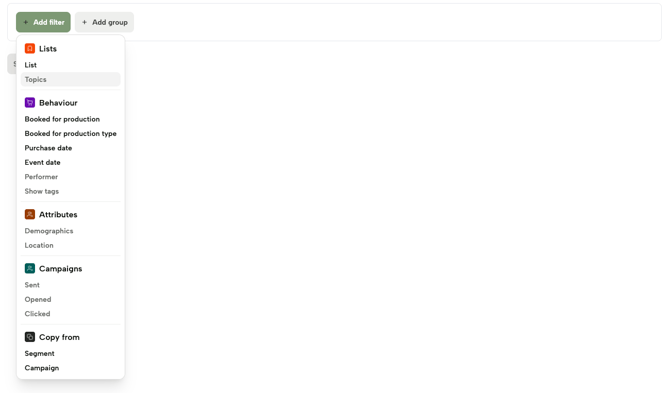
Behavioral Filters: Select users based on what they did.
-
Example: "Purchased a ticket for a Rodgers & Hammerstein show" AND "Purchase date was in the last 12 months."
-
-
Attribute Filters: Select users based on who they are.
-
Example: "Demographics" OR "Geography."
-
-
Nesting (AND/OR): You can add a "Filter Group" inside another group. This allows you to target, for example, people who bought tickets for either Cinderella OR Kiss Me Kate, but only if they also live in a specific city.
3. Workflow Example: The "2025 Buyers" Segment
To find everyone who booked in a specific year for a show or show type
-
Create a new segment.
-
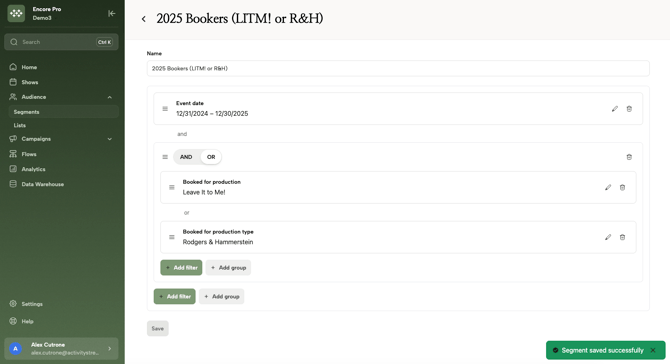
Add a Behavior filter: "Event Date" and set it to "Last Year" to include all sales from last year, as in this example.
-
Add a Group and toggle the relationship to "OR"
- Add a Behavior filter: "Production" to include sales from one specific production ("Leave It to Me!", in this example)
- Add a Behavior filter: "Production Type" to include all productions of a specific category ("Rodgers & Hammerstein", in this example)
- This list will return everyone who booked in 2025, as long as they booked for either "Leave It to Me!" or any "Rodgers & Hammerstein" show.