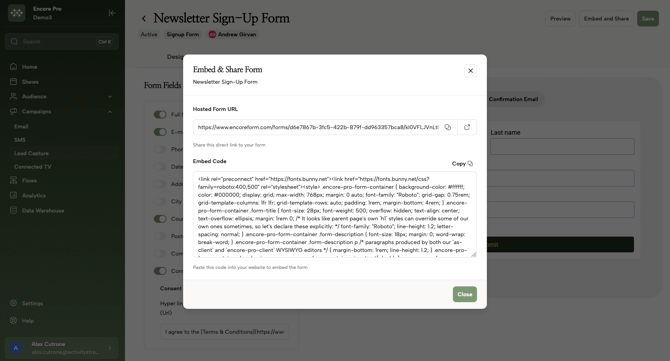
Lead Capture allows you to build custom forms to grow your email database, which can be embedded on your site or shared via a standalone link.
1. Form Field Customization
Navigate to Campaigns > Lead Capture to manage your acquisition forms.
-
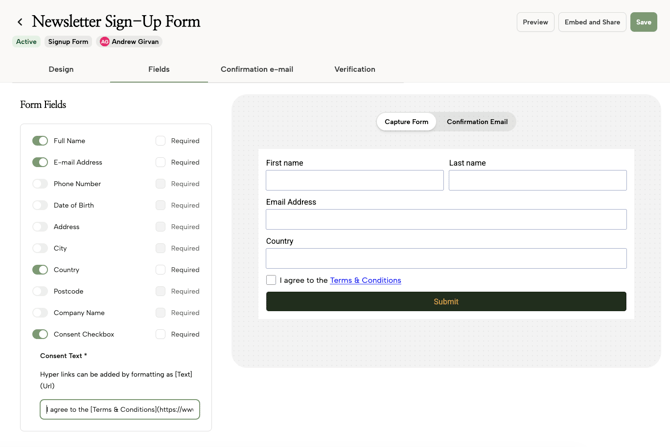
Field Selection: Toggle fields like First Name, Postcode, and Phone Number. You can mark any field as "Required" to ensure you collect essential data.
-
Consent Management: Add a Consent Checkbox with linked Terms and Conditions to remain compliant with data privacy regulations.
2. Branding and Success Actions
-
Branding Sets: Use the dropdown menu to apply pre-configured branding (colors, fonts, button styles) to your form instantly.
-
Redirects: Set a Redirect URL to send users back to your homepage after they sign up, or display a custom Submission Message.
3. Verification and Sharing
-
Double Opt-In: You can toggle Verify Email Addresses to send an automated confirmation email to new leads.
-
Deployment: Once saved, click Embed and Share to grab a direct Hosted URL for social media or an Embed Code for your website's footer or popup.